Following a request
The request page shows the document with every person's boxes in their colour, the Signers in order with what each has done — "Waiting", "Asked to sign", "Opened", "Signing…", "Signed" or "Declined", with the times, and under each person who signed which certificate they signed with: "Signed with: SuaveDocs certificate", "Signed with: their own certificate (<name>)" or "Signed with: the organisation certificate (<name>)" — and the History. While people are still signing, the page updates by itself every half minute and whenever you come back to it, so you see each signature arrive without reloading.
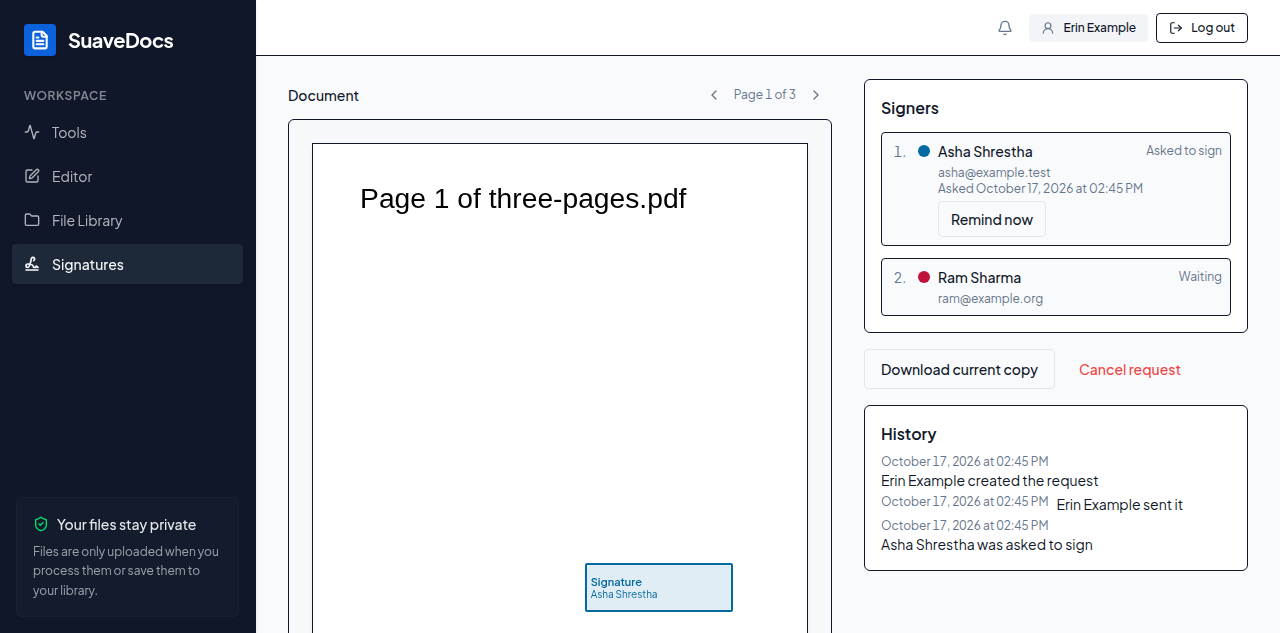 Figure: following a request.
A request that has been sent always finishes, whatever happens to your plan afterwards: reminders, cancelling and everyone's signing keep working.
- Remind now, next to the person whose turn it is, e-mails them again: "Reminder sent to
<name>." One reminder a day per person; a second one says "You reminded<name>less than a day ago. Try again tomorrow." If that person is signing at that moment it says "<name>is signing right now. Try again in a few minutes." If e-mail is switched off for the workspace, the page shows the sentence SuaveDocs gives and no reminder goes out. Reminders also go out by themselves, as often as you chose on step 3. - Download current copy gets the document with the signatures so far.
- Cancel request asks "Cancel this request?" — type a Reason (optional) and select Cancel request. Nobody else is asked to sign, and everyone on it is told.
If the signed document couldn't be made once everyone had signed, a red line under the state says "The completed document couldn't be made. Ask an administrator."
When everyone has signed: the state reads "Everyone signed", with Download signed document and Download completion certificate. Both are also saved in your file library ("<name> (signed).pdf" and "<name> — completion certificate.pdf") and shared with the people in your workspace who signed. The completion certificate lists every person, how they proved who they were, and when they opened and signed the document. The signed document carries one digital signature per person; PDF readers show them as verified once they trust your organisation's certificate (see For administrators → Signing).